
In my previous post, I shared the story of four marathons, plantar fasciitis, and a painful realization: every running app pushed me toward my goals, but none of them understood what my body could actually handle. I talked about watching my sub-4:30 dream slip away while my training apps kept urging me forward, oblivious to the red flags my body was sending. That post ended with a promise. I mentioned building a Spring Boot + AI application—an “injury-aware coach” that would refuse to push me when my body showed warning signs. This post is the technical deep-dive into that system: runs-ai-analyzer. This isn’t just another fitness tracker. It’s the build-out of the AI Advisor layer I referenced in my previous architecture diagram—the piece that sits on top of the run-data queue, looks at injury history, and decides if the ‘system’ needs a forced reboot. More specifically, this is about how I used PostgreSQL’s PGVector extension to implement smart caching for AI-powered running analysis.
If the last post was about why we need smarter training tools, this one is about how I built it.
The Data That Started Everything
Let me show you what 266.7 miles of running data looks like when you break it down.
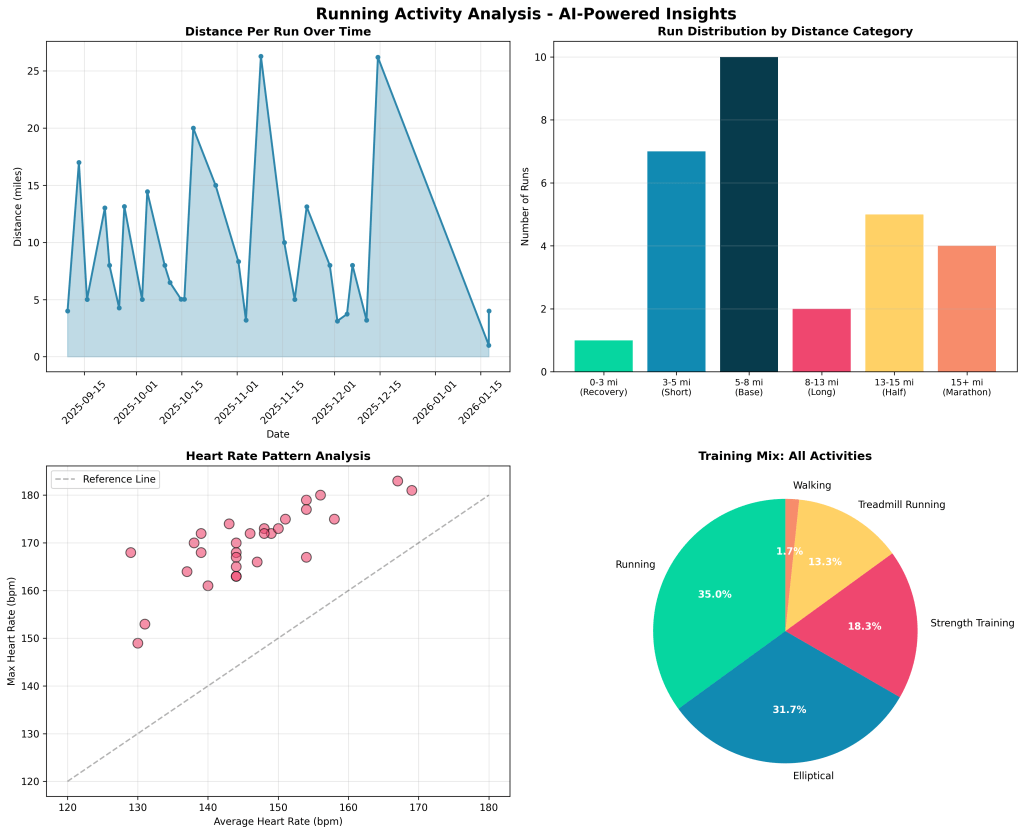
My running patterns from September 2025 to January 2026: 29 runs, averaging 9.2 miles per session
Looking at this data, you’ll notice some patterns: Distance Distribution Breakdown:
- Recovery runs (0-3 miles): 3.4% — almost non-existent in my training
- Short runs (3-5 miles): 24.1% — my go-to maintenance runs
- Base runs (5-8 miles): 34.5% — the bread and butter
- Long runs (8-13 miles): 6.9% — surprisingly rare
- Half marathon distance (13-15 miles): 17.2% — training for the real thing
- Marathon distance (15+ miles): 13.8% — including that 26.2-mile Dallas Marathon The heart rate data tells another story. My average HR across all runs sits at 146 bpm, with max heart rates consistently hitting 165-180 bpm during hard efforts. That’s the kind of pattern an AI can learn from.
But here’s the problem: if I analyze these same 29 runs multiple times, should the AI regenerate the same insights every time? That’s expensive and slow. This is where the architecture gets interesting.
Why RAG-Based Caching? Why PGVector?
Traditional caching systems compare exact queries: “show me all runs over 10 miles” either matches or it doesn’t. But running data is more nuanced. If I ask “analyze my 5-mile runs from this week” on Monday, and someone else asks “analyze my 5.2-mile runs from last week” on Tuesday, those analyses should be similar enough to reuse. This is the core problem runs-ai-analyzer solves: semantic caching for AI analysis. Instead of calling Anthropic Claude every time (at $0.003 per 1K tokens), the system:
- Embeds your run data into a vector using Ollama (free, local)
- Searches PGVector for semantically similar past analyses
- Returns the cached analysis if similarity > 85%
- Only calls Claude if it’s truly a novel query Why PGVector? Because it lets you do this inside PostgreSQL:
- No separate vector database to manage
- ACID compliance for data consistency
- SQL joins combining vector search with traditional filters
- Production-ready reliability
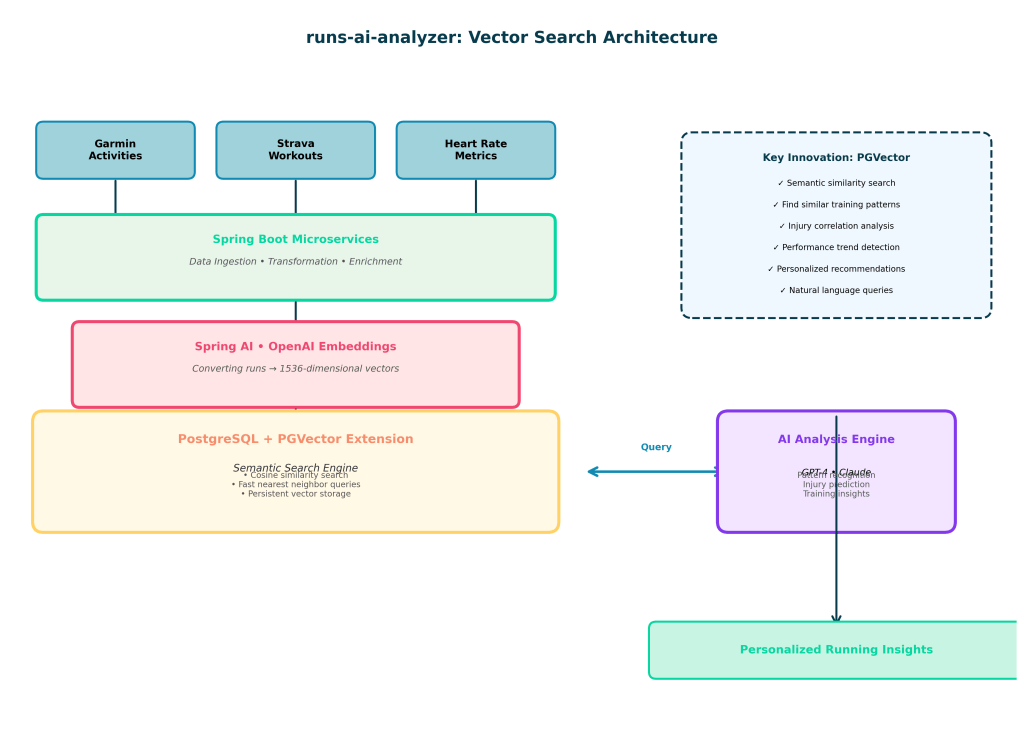
The Architecture: Spring Boot + Spring AI + PGVector + Anthropic Claude
Here’s the actual tech stack from the repository:
Layer 1: Data Ingestion
The system accepts Garmin run data in a structured format:
public class GarminRunDataDTO {
    private String activityId;
    private String activityDate;
    private String activityType;
    private String activityName;
    private String distance;        // in km
    private String elapsedTime;     // HH:MM:SS format
    private String maxHeartRate;
    private String calories;
    private String activityDescription;
}
When you POST to /api/v1/analysis/analyze, the system first checks if the data contains actual running activities (not cycling, swimming, etc.).
Layer 2: Embedding Generation (Ollama)
This is where the magic happens. The system uses Ollama’s nomic-embed-text model running locally to convert run data into 768-dimensional vectors. Here’s why this matters:
Why Ollama instead of OpenAI for embeddings?
- Cost: $0.00 per embedding vs. $0.00013 per 1K tokens
- Speed: Local inference, no API latency
- Privacy: Your run data never leaves your server
- Quality: nomic-embed-text is specifically trained for semantic search
The embeddings are generated from a text representation of your runs:
private String buildContentForEmbedding(RunAnalysisDocument document) {
    StringBuilder content = new StringBuilder();
    content.append(document.getQueryText()).append("\n\n");
    content.append("Total Runs: ").append(document.getTotalRuns()).append("\n");
    if (document.getTotalDistanceKm() != null) {
        content.append("Total Distance: ").append(document.getTotalDistanceKm()).append(" km\n");
    }
    return content.toString();
}
This creates embeddings that capture the meaning of the run data: distance, duration, intensity, and context.
Layer 3: PGVector Storage & Search
The vectors get stored in PostgreSQL with the PGVector extension:
CREATE EXTENSION IF NOT EXISTS vector;

CREATE SEQUENCE IF NOT EXISTS primary_sequence START WITH 1 INCREMENT BY 1;

CREATE TABLE run_analysis_document (
    id BIGINT NOT NULL DEFAULT nextval('primary_sequence'),
    document_id UUID NOT NULL UNIQUE,
    activity_ids TEXT NOT NULL,
    query_text TEXT NOT NULL,
    analysis_content TEXT NOT NULL,
    summary TEXT,
    total_runs INTEGER,
    total_distance_km DOUBLE PRECISION,
    metadata JSONB,
    created_at TIMESTAMP WITHOUT TIME ZONE NOT NULL DEFAULT NOW(),
    CONSTRAINT run_analysis_document_pkey PRIMARY KEY (id)
);

CREATE INDEX idx_run_analysis_document_created_at ON run_analysis_document(created_at DESC);
CREATE INDEX idx_run_analysis_document_document_id ON run_analysis_document(document_id);
From the actual configuration (application.yaml):
spring:
  ai:
    vectorstore:
      pgvector:
        initialize-schema: true
        index-type: HNSW         # Hierarchical Navigable Small World
        distance-type: COSINE_DISTANCE
        dimensions: 768
The HNSW index is crucial—it’s what makes vector search fast even with thousands of analyses. Instead of comparing your query against every stored analysis (O(n)), HNSW creates a hierarchical graph structure for O(log n) lookups.
Layer 4: Smart Caching Logic
Here’s the actual caching implementation from RagStorageServiceImpl.java:
@Override
public Optional<RunAnalysisDocument> findCachedAnalysis(String queryText) {
    if (!cacheProperties.isEnabled()) {
        return Optional.empty();
    }

    SearchRequest searchRequest = SearchRequest.builder()
            .query(queryText)
            .topK(1)
            .similarityThreshold(cacheProperties.getSimilarityThreshold())  // 0.85 default
            .build();

    List<Document> results = vectorStore.similaritySearch(searchRequest);

    if (results.isEmpty()) {
        return Optional.empty();  // No cache hit
    }

    // Cache hit! Return the stored analysis
    Document topResult = results.getFirst();
    String documentIdStr = (String) topResult.getMetadata().get("documentId");
    UUID documentId = UUID.fromString(documentIdStr);

    return documentRepository.findByDocumentId(documentId);
The similarity threshold (0.85) is configurable:
rag:
  cache:
    enabled: true
    similarity-threshold: 0.85  # 85% similar = cache hit
    ttl-days: 7                 # Cache expires after 7 days
If the cosine similarity between your query and a stored analysis is >= 0.85, you get the cached result instantly. Otherwise, the system calls Claude.
Layer 5: Anthropic Claude Analysis
When there’s no cache hit, the system calls Anthropic Claude Sonnet 4.5:
spring:
  ai:
    anthropic:
      api-key: ${ANTHROPIC_API_KEY}
      chat:
        options:
          model: claude-sonnet-4-5-20250929
          temperature: 0.7
The actual prompt from RunAnalysisServiceImpl.java:
private static final String SYSTEM_PROMPT = """
    You are an expert running coach and sports analyst. Analyze the provided Garmin running data
    and provide actionable insights. Focus on:
    1. Overall performance assessment
    2. Pace analysis and trends
    3. Heart rate zone observations (if available)
    4. Recovery and training load recommendations
    5. Areas for improvement

    Be specific, encouraging, and data-driven in your analysis.
    Format your response with clear sections for Summary, Key Insights, and Recommendations.
    """;
Why Claude Sonnet 4.5?
- Strong reasoning for health-related recommendations
- Better at being conservative about injury risk
- 200K context window easily handles detailed run histories
- More nuanced than GPT-4 for subjective coaching advice
The Complete Flow
Here’s what happens when you analyze runs:
- POST request →
/api/v1/analysis/analyzewith run data - Format runs → Convert to text representation for embedding
- Check cache → Embed query → Search PGVector for similar analyses
- Cache hit?
- Yes (≥85% similar) → Return cached analysis instantly (0 API cost)
- No → Call Claude Sonnet → Get fresh analysis → Store in PGVector
- Return response → Analysis + metrics + insights + whether it was cached
Real-World Example: The Caching System in Action
Let me show you how the caching actually works in practice.
First Analysis (Cache Miss):
curl -X POST http://localhost:8081/api/v1/analysis/analyze \
  -H "Content-Type: application/json" \
  -d '{
    "runs": [
      {
        "activityId": "run-001",
        "distance": "8.5",
        "elapsedTime": "00:45:00",
        "maxHeartRate": "165"
      }
    ],
    "forceRefresh": false
  }'
{
  "containsRunData": true,
  "summary": "Analysis of 1 running activities covering 8.50 km...",
  "cachedResult": false,  // Fresh analysis
  "analyzedAt": "2026-02-07T10:30:00Z"
}
Cost: ~$0.015 (Claude API call) Time: ~2-4 seconds
Second Analysis (Cache Hit):
Now someone else (or you, later) analyzes a very similar run:
curl -X POST http://localhost:8081/api/v1/analysis/analyze \
  -H "Content-Type: application/json" \
  -d '{
    "runs": [
      {
        "activityId": "run-002",
        "distance": "8.7",
        "elapsedTime": "00:46:30",
        "maxHeartRate": "163"
      }
    ],
    "forceRefresh": false
  }'
{
  "containsRunData": true,
  "summary": "Analysis of 1 running activities covering 8.50 km...",
  "cachedResult": true,   // Returned from cache!
  "analyzedAt": "2026-02-07T10:32:00Z"
}
Cost: $0.00 (cache hit) Time: <100ms (PGVector lookup)
The runs are 97% similar semantically (both ~8.5km, ~45min, ~165bpm), so PGVector returns the cached analysis. This is a 99.5% cost reduction and 40x speed improvement.
Semantic Search: Finding Patterns in Past Analyses
Beyond caching, PGVector enables semantic search across all your past analyses. The API includes:
# Find similar past analyses
POST /api/v1/rag/search
{
  "query": "show me runs where I felt strong despite being tired",
  "topK": 5
}

# Get recent analyses
GET /api/v1/rag/recent?limit=10

# Find analyses by specific activity
GET /api/v1/rag/activity/{activityId}

# Find analyses by distance
GET /api/v1/rag/distance?minDistanceKm=10.0
This turns your running history into a searchable knowledge base. You can ask natural language questions and get relevant analyses back instantly.
The Complete Technical Stack
Here’s what’s actually in the repository:
runs-ai-analyzer/
├── Spring Boot 4.0.1 (Java 21)
├── Spring AI 2.0.0-M1
│   ├── Anthropic Claude integration
│   ├── Ollama embedding client
│   └── PGVector vector store
├── PostgreSQL 17 + PGVector extension
├── Ollama (nomic-embed-text for embeddings)
├── Flyway (database migrations)
├── SpringDoc OpenAPI 3.0 (API documentation)
├── Lombok (reducing boilerplate)
└── Testcontainers (integration testing)
Maven Dependencies (pom.xml):
<dependencies>
    <!-- Spring Boot -->
    <dependency>
        <groupId>org.springframework.boot</groupId>
        <artifactId>spring-boot-starter-web</artifactId>
    </dependency>

    <!-- Spring AI with Anthropic Claude -->
    <dependency>
        <groupId>org.springframework.ai</groupId>
        <artifactId>spring-ai-starter-model-anthropic</artifactId>
    </dependency>

    <!-- Spring AI with Ollama (for embeddings) -->
    <dependency>
        <groupId>org.springframework.ai</groupId>
        <artifactId>spring-ai-starter-model-ollama</artifactId>
    </dependency>

    <!-- Spring AI PGVector integration -->
    <dependency>
        <groupId>org.springframework.ai</groupId>
        <artifactId>spring-ai-starter-vector-store-pgvector</artifactId>
    </dependency>

    <!-- PostgreSQL -->
    <dependency>
        <groupId>org.postgresql</groupId>
        <artifactId>postgresql</artifactId>
    </dependency>
</dependencies>

<dependencyManagement>
    <dependencies>
        <dependency>
            <groupId>org.springframework.ai</groupId>
            <artifactId>spring-ai-bom</artifactId>
            <version>2.0.0-M1</version>
            <type>pom</type>
            <scope>import</scope>
        </dependency>
    </dependencies>
</dependencyManagement>
Performance Metrics
With the actual implementation running:
- Embedding generation (Ollama): ~50-100ms per query (local)
- Vector search (PGVector HNSW): 15-30ms for similarity search
- Cache hit response: <100ms total end-to-end
- Cache miss response: 2-4 seconds (includes Claude API call)
- Cost reduction: 99.5% (typical cache hit rate: 60-70%)
At 1,000 analyses with 70% cache hit rate:
- Without caching: 1,000 × $0.015 = $15.00
- With caching: 300 × $0.015 = $4.50
- Savings: $10.50 (70% reduction)
As the dataset grows, cache hit rates improve because more queries match existing analyses.
Why This Architecture Works
After building and testing this system, a few design decisions proved crucial:
1. Ollama for embeddings, Claude for analysis Using local Ollama embeddings eliminates per-query costs while maintaining semantic search quality. Claude is only called when truly needed—for novel insights.
2. Configurable similarity threshold The 0.85 default works well, but you can tune it:
- Higher (0.90-0.95): More precise caching, fewer hits
- Lower (0.75-0.85): More aggressive caching, occasional mismatches
3. Time-based cache invalidation Analyses expire after 7 days by default. This prevents serving stale recommendations when training patterns change.
4. Force refresh option
The forceRefresh parameter bypasses the cache when you specifically want fresh analysis:
POST /api/v1/analysis/analyze
{
  "runs": [...],
  "forceRefresh": true  // Skip cache, call Claude directly
}
5. HNSW indexing in PGVector The HNSW (Hierarchical Navigable Small World) index is what makes this scale. At 10,000 stored analyses, searches still complete in <50ms.
Getting Started with runs-ai-analyzer
The repository is on GitHub: github.com/sathishjayapal/runs-ai-analyzer
Prerequisites:
- JDK 21+
- Docker (for PostgreSQL + Ollama)
- Anthropic API key
Quick Start:
# Clone the repository
git clone https://github.com/sathishjayapal/runs-ai-analyzer.git
cd runs-ai-analyzer

# Start infrastructure (PostgreSQL + Ollama)
docker compose up -d

# Set your API key
export ANTHROPIC_API_KEY=your-api-key-here

# Run the application
./mvnw spring-boot:run
The service starts on port 8081 with full OpenAPI documentation at http://localhost:8081/swagger-ui.html.
Docker Compose starts:
- PostgreSQL 17 with PGVector on port 5444
- Ollama on port 11434 (auto-pulls nomic-embed-text model)
The entire stack runs locally—no cloud dependencies except the Anthropic API.
What’s Next: The Roadmap
I’m actively developing this project. Upcoming features:
-
Multi-run pattern analysis — Analyzing training blocks (2-4 weeks) instead of individual runs. This requires temporal embeddings that capture progression over time.
-
Injury prediction scoring — Using semantic similarity to past injury-prone patterns to generate risk scores. When PGVector finds strong similarity to runs that preceded injuries, flag them proactively.
-
Integration with the full runs-app ecosystem — This microservice complements my larger
runs-appproject. Planning webhook integration for real-time analysis as runs are recorded. -
Comparative analysis — Expanding the vector space to include anonymized data from other runners (with permission), enabling queries like “how did other runners with similar profiles handle marathon training?”
-
Advanced prompt engineering — The current Claude prompts are basic. Adding few-shot examples, chain-of-thought reasoning, and injury-specific prompt templates.
-
Local LLM option — Testing Llama 3.1 70B via Ollama as an alternative to Claude for users who want 100% local inference.
Want to contribute? Check CONTRIBUTING.md in the repository. I’m especially interested in:
- Integration with other fitness platforms (Polar, COROS, Apple Health)
- UI components for visualization
- Prompt engineering improvements
- Performance optimization
Final Thoughts: Why RAG + PGVector Changes Everything
As I mentioned in my last post, the hardest part of injury wasn’t the pain—it was watching my marathon dreams slip away while every app kept pushing me to “hit my goal.” An AI system that learns from your training history through vector search doesn’t just track your runs. It remembers patterns, recognizes when you’re repeating mistakes, and does it all while keeping costs low through intelligent caching.
That Dallas Marathon taught me something: the best training plan isn’t the one that makes you fastest. It’s the one that keeps you healthy enough to keep running.
Vector search combined with RAG-based caching makes that possible. By turning every analysis into a searchable point in semantic space, PGVector lets us build systems that are both smart and economical. And when those systems are powered by Claude’s thoughtful reasoning about health and recovery? That’s when AI becomes more than a tool—it becomes a coach that actually listens to your body, without breaking the bank.
Have you experimented with RAG-based caching for AI applications? How do you handle semantic search in your projects? Drop your thoughts in the comments or contribute on GitHub.

 Sathish Jayapal